Кинэтовий автомат (FSM)
Кинцевий автомат, кинцевий автоматон, или машина станив (FSM, FSA, finite automaton, state machine) - это математична модель обчислень.
Это абстрактна машина, которая может перебувати в одному зи скинченнои килькости станив в будь-который момент часу. Кинцевий автомат может переходити с одного состояния в инший в ответ на некоторые вхидни дани; перехид с одного состояния в инший називаеться переходом.
Кинцевий автомат визначаеться списком его станив, початковим состоянием и вхидними данными, которые запускають каждый перехид.
Источник: WikiPedia
Пример использования
Не все функции бота можно реализувати как единый обработчик (handler), например, если Вам нужно будет збирати некоторые дани от пользователя в окремих кроках, вам нужно будет использовать FSM.
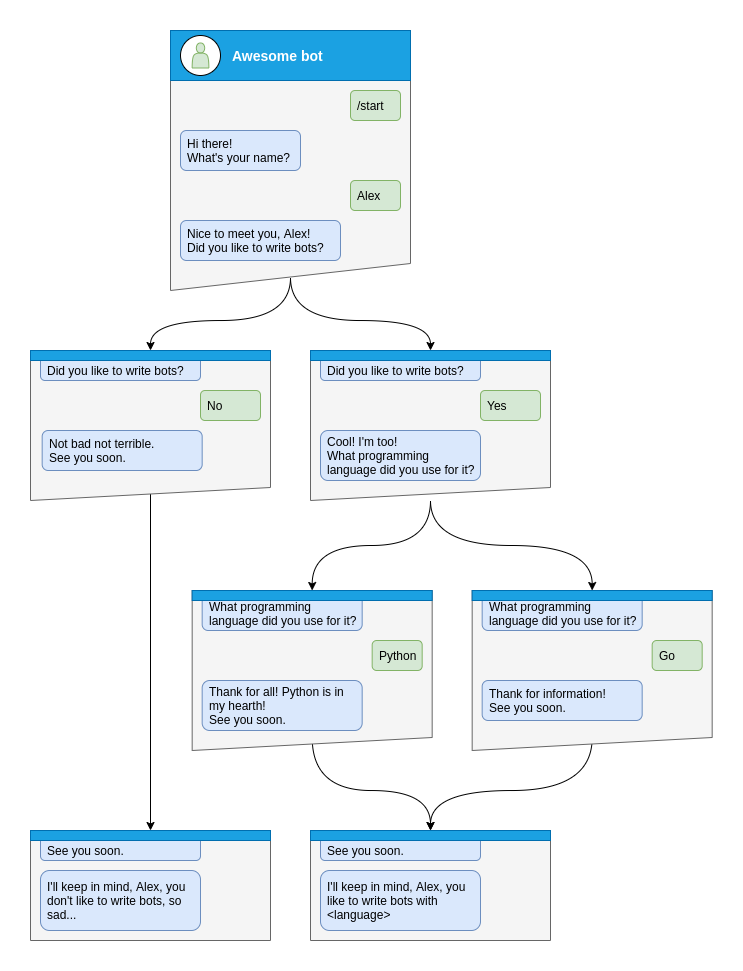
Гайда, подивимось как реализувати это шаг за кроком
Шаг за кроком
Перед обробкою будь-которых станив Вам нужно будет указать тип станив, которые Ви хотите обробляти
class Form(StatesGroup):
    name = State()
    like_bots = State()
    language = State()
А потим напишить обработчик (handler) для каждого состояния окремо от початку диалогу
Тут диалог можно начать только с помощью команды /start, поэтому давайте обробимо её и зробимо перехид пользователя к состояния Form.name
@form_router.message(CommandStart())
async def command_start(message: Message, state: FSMContext) -> None:
    await state.set_state(Form.name)
    await message.answer(
        "Hi there! What's your name?",
        reply_markup=ReplyKeyboardRemove(),
    )
После этого Вам нужно будет сохранить некоторые дани в пам’яти и перейти к наступного кроку.
@form_router.message(Form.name)
async def process_name(message: Message, state: FSMContext) -> None:
    await state.update_data(name=message.text)
    await state.set_state(Form.like_bots)
    await message.answer(
        f"Nice to meet you, {html.quote(message.text)}!\nDid you like to write bots?",
        reply_markup=ReplyKeyboardMarkup(
            keyboard=[
                [
                    KeyboardButton(text="Yes"),
                    KeyboardButton(text="No"),
                ],
            ],
            resize_keyboard=True,
        ),
    )
На наступних кроках пользователь может дати ризни видповиди, это может быть «так», «ни» или будь-что инше
Обробка yes и скоро нам нужно будет обробити стан Form.language
@form_router.message(Form.like_bots, F.text.casefold() == "yes")
async def process_like_write_bots(message: Message, state: FSMContext) -> None:
    await state.set_state(Form.language)

    await message.reply(
        "Cool! I'm too!\nWhat programming language did you use for it?",
        reply_markup=ReplyKeyboardRemove(),
    )
Обробка no
@form_router.message(Form.like_bots, F.text.casefold() == "no")
async def process_dont_like_write_bots(message: Message, state: FSMContext) -> None:
    data = await state.get_data()
    await state.clear()
    await message.answer(
        "Not bad not terrible.\nSee you soon.",
        reply_markup=ReplyKeyboardRemove(),
    )
    await show_summary(message=message, data=data, positive=False)
І обробка будь-которых других ответов
@form_router.message(Form.like_bots)
async def process_unknown_write_bots(message: Message) -> None:
    await message.reply("I don't understand you :(")
Вси можливи випадки кроку like_bots було розглянуто, нумо реализуемо останний шаг
@form_router.message(Form.language)
async def process_language(message: Message, state: FSMContext) -> None:
    data = await state.update_data(language=message.text)
    await state.clear()

    if message.text.casefold() == "python":
        await message.reply(
            "Python, you say? That's the language that makes my circuits light up! 😉",
        )

    await show_summary(message=message, data=data)
async def show_summary(message: Message, data: dict[str, Any], positive: bool = True) -> None:
    name = data["name"]
    language = data.get("language", "<something unexpected>")
    text = f"I'll keep in mind that, {html.quote(name)}, "
    text += f"you like to write bots with {html.quote(language)}." if positive else "you don't like to write bots, so sad..."
    await message.answer(text=text, reply_markup=ReplyKeyboardRemove())
І теперь Ви виконали все кроки на зображенни, но вы можете зробити можливисть скасувати диалог, давайте зробимо это с помощью команды или тексту
@form_router.message(Command("cancel"))
@form_router.message(F.text.casefold() == "cancel")
async def cancel_handler(message: Message, state: FSMContext) -> None:
    """
    Allow user to cancel any action
    """
    current_state = await state.get_state()
    if current_state is None:
        return

    logging.info("Cancelling state %r", current_state)
    await state.clear()
    await message.answer(
        "Cancelled.",
        reply_markup=ReplyKeyboardRemove(),
    )
Повний пример
  1from __future__ import annotations
  2
  3import asyncio
  4import logging
  5import sys
  6from os import getenv
  7from typing import TYPE_CHECKING, Any
  8
  9from litegram import Bot, Dispatcher, F, Router, html
 10from litegram.client.default import DefaultBotProperties
 11from litegram.enums import ParseMode
 12from litegram.filters import Command, CommandStart
 13from litegram.fsm.state import State, StatesGroup
 14from litegram.types import (
 15    KeyboardButton,
 16    Message,
 17    ReplyKeyboardMarkup,
 18    ReplyKeyboardRemove,
 19)
 20
 21if TYPE_CHECKING:
 22    from litegram.fsm.context import FSMContext
 23
 24TOKEN = getenv("BOT_TOKEN")
 25
 26form_router = Router()
 27
 28
 29class Form(StatesGroup):
 30    name = State()
 31    like_bots = State()
 32    language = State()
 33
 34
 35@form_router.message(CommandStart())
 36async def command_start(message: Message, state: FSMContext) -> None:
 37    await state.set_state(Form.name)
 38    await message.answer(
 39        "Hi there! What's your name?",
 40        reply_markup=ReplyKeyboardRemove(),
 41    )
 42
 43
 44@form_router.message(Command("cancel"))
 45@form_router.message(F.text.casefold() == "cancel")
 46async def cancel_handler(message: Message, state: FSMContext) -> None:
 47    """
 48    Allow user to cancel any action
 49    """
 50    current_state = await state.get_state()
 51    if current_state is None:
 52        return
 53
 54    logging.info("Cancelling state %r", current_state)
 55    await state.clear()
 56    await message.answer(
 57        "Cancelled.",
 58        reply_markup=ReplyKeyboardRemove(),
 59    )
 60
 61
 62@form_router.message(Form.name)
 63async def process_name(message: Message, state: FSMContext) -> None:
 64    await state.update_data(name=message.text)
 65    await state.set_state(Form.like_bots)
 66    await message.answer(
 67        f"Nice to meet you, {html.quote(message.text)}!\nDid you like to write bots?",
 68        reply_markup=ReplyKeyboardMarkup(
 69            keyboard=[
 70                [
 71                    KeyboardButton(text="Yes"),
 72                    KeyboardButton(text="No"),
 73                ],
 74            ],
 75            resize_keyboard=True,
 76        ),
 77    )
 78
 79
 80@form_router.message(Form.like_bots, F.text.casefold() == "no")
 81async def process_dont_like_write_bots(message: Message, state: FSMContext) -> None:
 82    data = await state.get_data()
 83    await state.clear()
 84    await message.answer(
 85        "Not bad not terrible.\nSee you soon.",
 86        reply_markup=ReplyKeyboardRemove(),
 87    )
 88    await show_summary(message=message, data=data, positive=False)
 89
 90
 91@form_router.message(Form.like_bots, F.text.casefold() == "yes")
 92async def process_like_write_bots(message: Message, state: FSMContext) -> None:
 93    await state.set_state(Form.language)
 94
 95    await message.reply(
 96        "Cool! I'm too!\nWhat programming language did you use for it?",
 97        reply_markup=ReplyKeyboardRemove(),
 98    )
 99
100
101@form_router.message(Form.like_bots)
102async def process_unknown_write_bots(message: Message) -> None:
103    await message.reply("I don't understand you :(")
104
105
106@form_router.message(Form.language)
107async def process_language(message: Message, state: FSMContext) -> None:
108    data = await state.update_data(language=message.text)
109    await state.clear()
110
111    if message.text.casefold() == "python":
112        await message.reply(
113            "Python, you say? That's the language that makes my circuits light up! 😉",
114        )
115
116    await show_summary(message=message, data=data)
117
118
119async def show_summary(message: Message, data: dict[str, Any], positive: bool = True) -> None:
120    name = data["name"]
121    language = data.get("language", "<something unexpected>")
122    text = f"I'll keep in mind that, {html.quote(name)}, "
123    text += f"you like to write bots with {html.quote(language)}." if positive else "you don't like to write bots, so sad..."
124    await message.answer(text=text, reply_markup=ReplyKeyboardRemove())
125
126
127async def main() -> None:
128    # Initialize Bot instance with default bot properties which will be passed to all API calls
129    bot = Bot(token=TOKEN, default=DefaultBotProperties(parse_mode=ParseMode.HTML))
130
131    dp = Dispatcher()
132
133    dp.include_router(form_router)
134
135    # Start event dispatching
136    await dp.start_polling(bot)
137
138
139if __name__ == "__main__":
140    logging.basicConfig(level=logging.INFO, stream=sys.stdout)
141    asyncio.run(main())
Changing state for another user
In some cases, you might need to change the state for a user other than the one who triggered the current handler. For example, you might want to change the state of a user based on an admin’s command.
To do this, you can use the get_context method of the FSM middleware through the dispatcher:
@example_router.message(Command("example"))
async def command_example(message: Message, dispatcher: Dispatcher, bot: Bot):
    user_id = ...  # Get the user ID in the way that you need
    state = await dispatcher.fsm.get_context(
        bot=bot,
        chat_id=user_id,
        user_id=user_id,
    )

    # Now you can use the state context to change the state for the specified user
    await state.set_state(YourState.some_state)

    # Or store data in the state
    await state.update_data(some_key="some_value")

    # Or clear the state
    await state.clear()
This allows you to manage the state of any user in your bot, not just the one who triggered the current handler.