Finite State Machine
A finite-state machine (FSM) or finite-state automaton (FSA, plural: automata), finite automaton, or simply a state machine, is a mathematical model of computation.
It is an abstract machine that can be in exactly one of a finite number of states at any given time. The FSM can change from one state to another in response to some inputs; the change from one state to another is called a transition.
An FSM is defined by a list of its states, its initial state, and the inputs that trigger each transition.
Source: WikiPedia
Usage example
Not all functionality of the bot can be implemented as single handler, for example you will need to collect some data from user in separated steps you will need to use FSM.
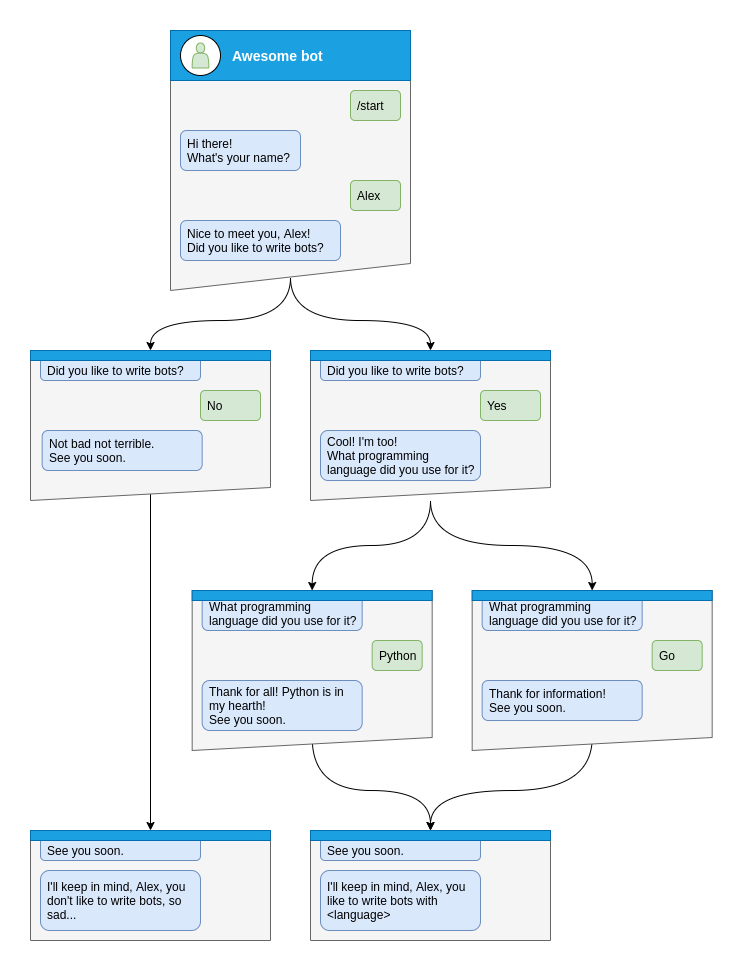
Let’s see how to do that step-by-step
Step by step
Before handle any states you will need to specify what kind of states you want to handle
class Form(StatesGroup):
    name = State()
    like_bots = State()
    language = State()
And then write handler for each state separately from the start of dialog
Here is dialog can be started only via command /start, so lets handle it and make transition user to state Form.name
@form_router.message(CommandStart())
async def command_start(message: Message, state: FSMContext) -> None:
    await state.set_state(Form.name)
    await message.answer(
        "Hi there! What's your name?",
        reply_markup=ReplyKeyboardRemove(),
    )
After that you will need to save some data to the storage and make transition to next step.
@form_router.message(Form.name)
async def process_name(message: Message, state: FSMContext) -> None:
    await state.update_data(name=message.text)
    await state.set_state(Form.like_bots)
    await message.answer(
        f"Nice to meet you, {html.quote(message.text)}!\nDid you like to write bots?",
        reply_markup=ReplyKeyboardMarkup(
            keyboard=[
                [
                    KeyboardButton(text="Yes"),
                    KeyboardButton(text="No"),
                ],
            ],
            resize_keyboard=True,
        ),
    )
At the next steps user can make different answers, it can be yes, no or any other
Handle yes and soon we need to handle Form.language state
@form_router.message(Form.like_bots, F.text.casefold() == "yes")
async def process_like_write_bots(message: Message, state: FSMContext) -> None:
    await state.set_state(Form.language)

    await message.reply(
        "Cool! I'm too!\nWhat programming language did you use for it?",
        reply_markup=ReplyKeyboardRemove(),
    )
Handle no
@form_router.message(Form.like_bots, F.text.casefold() == "no")
async def process_dont_like_write_bots(message: Message, state: FSMContext) -> None:
    data = await state.get_data()
    await state.clear()
    await message.answer(
        "Not bad not terrible.\nSee you soon.",
        reply_markup=ReplyKeyboardRemove(),
    )
    await show_summary(message=message, data=data, positive=False)
And handle any other answers
@form_router.message(Form.like_bots)
async def process_unknown_write_bots(message: Message) -> None:
    await message.reply("I don't understand you :(")
All possible cases of like_bots step was covered, let’s implement finally step
@form_router.message(Form.language)
async def process_language(message: Message, state: FSMContext) -> None:
    data = await state.update_data(language=message.text)
    await state.clear()

    if message.text.casefold() == "python":
        await message.reply(
            "Python, you say? That's the language that makes my circuits light up! 😉",
        )

    await show_summary(message=message, data=data)
async def show_summary(message: Message, data: dict[str, Any], positive: bool = True) -> None:
    name = data["name"]
    language = data.get("language", "<something unexpected>")
    text = f"I'll keep in mind that, {html.quote(name)}, "
    text += f"you like to write bots with {html.quote(language)}." if positive else "you don't like to write bots, so sad..."
    await message.answer(text=text, reply_markup=ReplyKeyboardRemove())
And now you have covered all steps from the image, but you can make possibility to cancel conversation, lets do that via command or text
@form_router.message(Command("cancel"))
@form_router.message(F.text.casefold() == "cancel")
async def cancel_handler(message: Message, state: FSMContext) -> None:
    """
    Allow user to cancel any action
    """
    current_state = await state.get_state()
    if current_state is None:
        return

    logging.info("Cancelling state %r", current_state)
    await state.clear()
    await message.answer(
        "Cancelled.",
        reply_markup=ReplyKeyboardRemove(),
    )
Complete example
  1from __future__ import annotations
  2
  3import asyncio
  4import logging
  5import sys
  6from os import getenv
  7from typing import TYPE_CHECKING, Any
  8
  9from litegram import Bot, Dispatcher, F, Router, html
 10from litegram.client.default import DefaultBotProperties
 11from litegram.enums import ParseMode
 12from litegram.filters import Command, CommandStart
 13from litegram.fsm.state import State, StatesGroup
 14from litegram.types import (
 15    KeyboardButton,
 16    Message,
 17    ReplyKeyboardMarkup,
 18    ReplyKeyboardRemove,
 19)
 20
 21if TYPE_CHECKING:
 22    from litegram.fsm.context import FSMContext
 23
 24TOKEN = getenv("BOT_TOKEN")
 25
 26form_router = Router()
 27
 28
 29class Form(StatesGroup):
 30    name = State()
 31    like_bots = State()
 32    language = State()
 33
 34
 35@form_router.message(CommandStart())
 36async def command_start(message: Message, state: FSMContext) -> None:
 37    await state.set_state(Form.name)
 38    await message.answer(
 39        "Hi there! What's your name?",
 40        reply_markup=ReplyKeyboardRemove(),
 41    )
 42
 43
 44@form_router.message(Command("cancel"))
 45@form_router.message(F.text.casefold() == "cancel")
 46async def cancel_handler(message: Message, state: FSMContext) -> None:
 47    """
 48    Allow user to cancel any action
 49    """
 50    current_state = await state.get_state()
 51    if current_state is None:
 52        return
 53
 54    logging.info("Cancelling state %r", current_state)
 55    await state.clear()
 56    await message.answer(
 57        "Cancelled.",
 58        reply_markup=ReplyKeyboardRemove(),
 59    )
 60
 61
 62@form_router.message(Form.name)
 63async def process_name(message: Message, state: FSMContext) -> None:
 64    await state.update_data(name=message.text)
 65    await state.set_state(Form.like_bots)
 66    await message.answer(
 67        f"Nice to meet you, {html.quote(message.text)}!\nDid you like to write bots?",
 68        reply_markup=ReplyKeyboardMarkup(
 69            keyboard=[
 70                [
 71                    KeyboardButton(text="Yes"),
 72                    KeyboardButton(text="No"),
 73                ],
 74            ],
 75            resize_keyboard=True,
 76        ),
 77    )
 78
 79
 80@form_router.message(Form.like_bots, F.text.casefold() == "no")
 81async def process_dont_like_write_bots(message: Message, state: FSMContext) -> None:
 82    data = await state.get_data()
 83    await state.clear()
 84    await message.answer(
 85        "Not bad not terrible.\nSee you soon.",
 86        reply_markup=ReplyKeyboardRemove(),
 87    )
 88    await show_summary(message=message, data=data, positive=False)
 89
 90
 91@form_router.message(Form.like_bots, F.text.casefold() == "yes")
 92async def process_like_write_bots(message: Message, state: FSMContext) -> None:
 93    await state.set_state(Form.language)
 94
 95    await message.reply(
 96        "Cool! I'm too!\nWhat programming language did you use for it?",
 97        reply_markup=ReplyKeyboardRemove(),
 98    )
 99
100
101@form_router.message(Form.like_bots)
102async def process_unknown_write_bots(message: Message) -> None:
103    await message.reply("I don't understand you :(")
104
105
106@form_router.message(Form.language)
107async def process_language(message: Message, state: FSMContext) -> None:
108    data = await state.update_data(language=message.text)
109    await state.clear()
110
111    if message.text.casefold() == "python":
112        await message.reply(
113            "Python, you say? That's the language that makes my circuits light up! 😉",
114        )
115
116    await show_summary(message=message, data=data)
117
118
119async def show_summary(message: Message, data: dict[str, Any], positive: bool = True) -> None:
120    name = data["name"]
121    language = data.get("language", "<something unexpected>")
122    text = f"I'll keep in mind that, {html.quote(name)}, "
123    text += f"you like to write bots with {html.quote(language)}." if positive else "you don't like to write bots, so sad..."
124    await message.answer(text=text, reply_markup=ReplyKeyboardRemove())
125
126
127async def main() -> None:
128    # Initialize Bot instance with default bot properties which will be passed to all API calls
129    bot = Bot(token=TOKEN, default=DefaultBotProperties(parse_mode=ParseMode.HTML))
130
131    dp = Dispatcher()
132
133    dp.include_router(form_router)
134
135    # Start event dispatching
136    await dp.start_polling(bot)
137
138
139if __name__ == "__main__":
140    logging.basicConfig(level=logging.INFO, stream=sys.stdout)
141    asyncio.run(main())
Changing state for another user
In some cases, you might need to change the state for a user other than the one who triggered the current handler. For example, you might want to change the state of a user based on an admin’s command.
To do this, you can use the get_context method of the FSM middleware through the dispatcher:
@example_router.message(Command("example"))
async def command_example(message: Message, dispatcher: Dispatcher, bot: Bot):
    user_id = ...  # Get the user ID in the way that you need
    state = await dispatcher.fsm.get_context(
        bot=bot,
        chat_id=user_id,
        user_id=user_id,
    )

    # Now you can use the state context to change the state for the specified user
    await state.set_state(YourState.some_state)

    # Or store data in the state
    await state.update_data(some_key="some_value")

    # Or clear the state
    await state.clear()
This allows you to manage the state of any user in your bot, not just the one who triggered the current handler.